Semantic Clustering and Search Results Parsing via Mobile Proxies: A Step-by-Step Guide
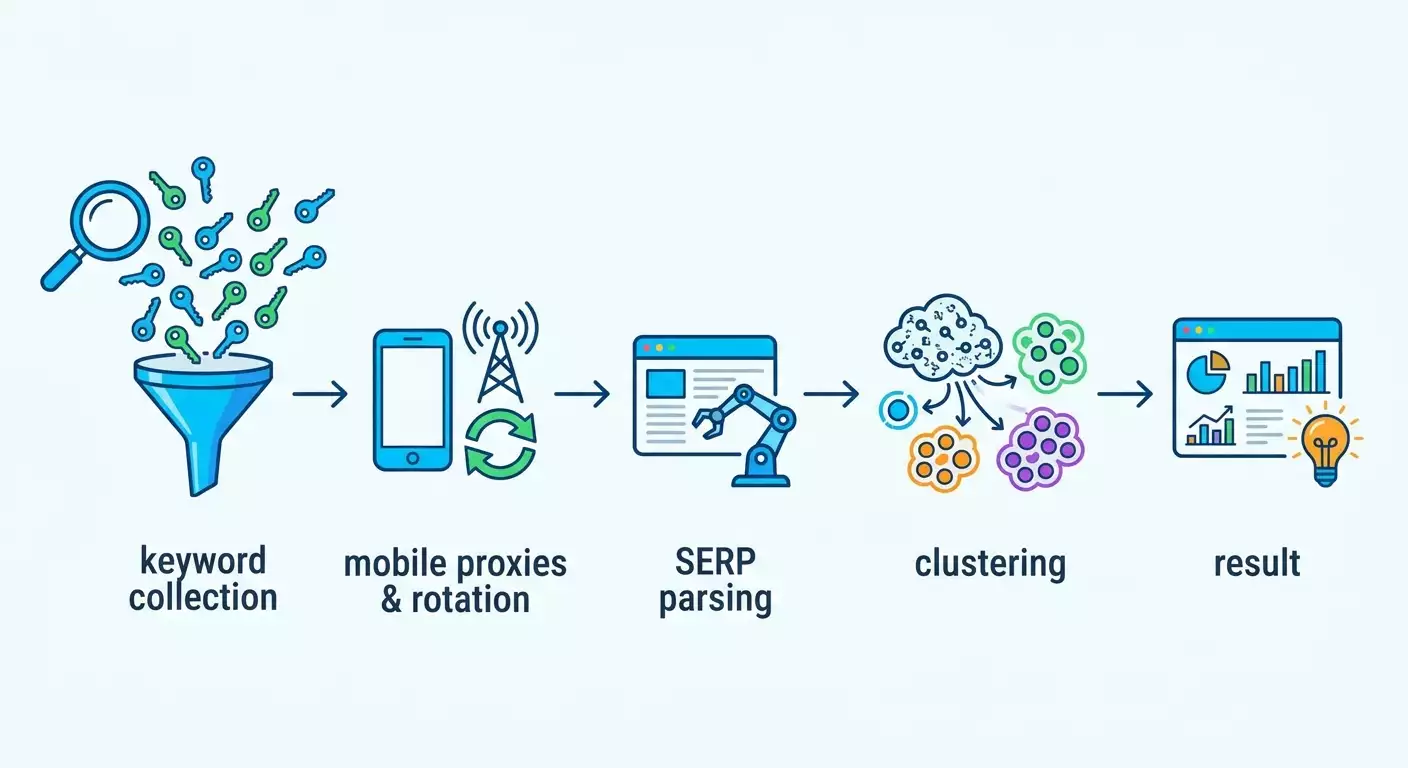
Table of contents
- Introduction
- Preliminary preparation
- Basic concepts
- Step 1: build your semantic core
- Step 2: connect and configure mobile proxies
- Step 3: set up rotation and delays
- Step 4: parse search results and collect serp
- Step 5: cluster based on results
- Anti-ban: safe work practices
- Verifying the result
- Common errors and solutions
- Additional capabilities
- Faq
- Conclusion
Introduction
In this step-by-step guide, you'll learn how to build a semantic core, configure search results parsing through mobile proxies, perform semantic clustering based on result overlap, and get a final file with ready-made query groups for your pages. This tutorial is designed for beginners but also includes elements for advanced users, giving you a confident, predictable result. You'll get: a keyword list, SERP exports for each key, grouped clusters, page priorities, and ready files for content and briefs.
This guide is suitable for SEO specialists, content marketers, website owners, analysts, and anyone who wants to understand how semantic clustering works in practice without unnecessary theory.
It's helpful to know the basics beforehand: what keywords are, how to work with spreadsheets, and how to save CSV files. Even if you have no experience, we've included the most detailed steps possible.
Estimated time: for a quick run with a ready keyword list, you'll spend 3-5 hours. For a full cycle from scratch, count on 1-2 working days, including parsing, clustering, and verification.
Preliminary Preparation
Before starting, gather your tools and access information so you don't get distracted along the way.
Necessary Tools, Software, Access
- A computer with Windows 10 or newer, macOS 12+, or Linux Ubuntu 20.04+.
- A spreadsheet editor: Google Sheets or Excel 2019+.
- A tool for keyword collection and SERP parsing: Key Collector or a similar desktop parser. For more details, check out the internal material on Key Collector: Key Collector Guide.
- An account with a mobile proxy provider. In this guide, we'll use mobileproxy.space as a clear example.
- An up-to-date version of Chrome, Edge, or Firefox.
System Requirements
- 4 GB of RAM for comfortable work with small projects, 8 GB+ for large keyword lists (50,000+).
- Free disk space: 2-5 GB for exports and backups.
- Stable internet: at least 10 Mbps, without significant delays.
What to Download, Install, and Configure
- Install your chosen parser (e.g., Key Collector). Run the program and go through the activation process.
- Create a project folder, e.g., D:\SEO\Project\Semantics. Inside, create subfolders: input, serp, clusters, backups.
- Create a semantics file input\keywords_raw.csv. To start, just one column is enough: keyword.
- Set up an account with a mobile proxy provider. In your personal cabinet, create an access point and get the proxy address, port, login, and password, or configure IP-based authorization.
Backups
Every time you finish a stage (collected keywords, parsed SERP, performed clustering), save a backup to the backups folder with the date and time in the filename.
Tip: Make filenames clear: keywords_2026-06-22.csv, serp_top10_2026-06-22.csv, clusters_v1_2026-06-22.xlsx. This way you can easily return to the needed version.
⚠️ Caution: Do not store proxy access information in an open document. Use a password manager or encrypted notes.
Basic Concepts
Key Terms in Simple Language
- Semantic core — a list of key phrases that users enter when searching for your products or services.
- Semantic clustering — grouping similar queries into clusters so that each group corresponds to one page on your site.
- Search results parsing (SERP) — automatically retrieving the top results for each keyword.
- Mobile proxies — proxies that use IP addresses from mobile carriers. They change frequently and appear to search engines as regular mobile users.
Basic Operating Principles
- Collect keywords using any convenient method.
- Parse the top results for each word through mobile proxies, respecting limits and delays.
- Compare result overlaps and combine keywords into clusters.
What to Understand Before Starting
- Follow the rules and terms of service. Work gently, with delays and request limits.
- Only use permitted data sources. If available, use official APIs or export functions.
Tip: For stability, keep request frequency low and even, and schedule tasks for periods with minimal load.
⚠️ Caution: Always comply with user agreements and applicable laws. If a site provides an official API or export, prioritize using those features.
Step 1: Build Your Semantic Core
Goal of This Stage
Get a clean list of keywords in CSV format with one phrase per line.
Instructions
- Open Key Collector and create a new project. Click File, then New Project, specify the project folder and a name, e.g., Project_Semantics.kc.
- Add initial keywords: click Add Phrases, paste the list from the clipboard or import from the file input\keywords_raw.csv.
- Set the region and search engine: open Project Settings, choose the desired region and language. For example, Yandex Russia or Google Russia.
- Remove duplicates: click Operations, then Delete Duplicates. Confirm the deletion.
- Clean up junk: delete clearly irrelevant phrases. Use filters with stop words if you have them prepared in advance.
- Save the file: File, Save, ensure Project_Semantics.kc is updated. Export the current list to input\keywords_clean.csv via File, Export, CSV.
Tip: If you're new to Key Collector, check out the internal breakdown of features in the material: Key Collector Guide. It includes ready-made filter templates.
✅ Verification: The input folder should contain a file keywords_clean.csv with one column (keyword) and at least 50–100 rows.
Possible Problems and Solutions
- Problem: The list contains many duplicate word forms. Cause: Normalization and lemmatization were not applied. Solution: During filtering, use grouping by base form, or leave all variants — it's not critical for SERP-based clustering.
- Problem: CSV file won't open. Cause: Encoding or delimiter issues. Solution: When exporting, choose UTF-8 and comma or semicolon delimiter, then re-export.
Step 2: Connect and Configure Mobile Proxies
Goal of This Stage
Connect mobile proxies and ensure that requests from the parser go through them.
Instructions
- Log into your mobile proxy provider's personal cabinet. Using mobileproxy.space as an example, create a new proxy channel. Select country and operator if needed.
- Get the parameters: proxy address (host), port, login, and password. If using IP-based authorization, add your white IP in the settings.
- Open your parser. In Key Collector, go to Settings, then Proxy section.
- Add the proxy: click Add, specify the format http://login:password@host:port or enter host, port, and credentials in separate fields.
- Check the box Use proxy for search engine requests. Save settings.
- Test the connection: click Test Proxy. Ensure the status is Successful and the displayed IP is from a mobile carrier.
Tip: If your provider gives a Quick IP Change link, save it. It will be useful for manual rotation from the parser or an external task scheduler.
⚠️ Caution: Do not use free or unknown proxies. They risk data leakage and wasted time due to instability.
✅ Verification: In the proxy testing window, you see a green status. When you open a site like whatismyip via the built-in test, it shows a mobile IP.
Possible Problems and Solutions
- Problem: Proxy test fails. Cause: Incorrect password or blocked port. Solution: Double-check login and password, verify with the provider's instructions, try a different port.
- Problem: IP does not change. Cause: Rotation is not enabled or a fixed channel is selected. Solution: Configure rotation in the provider's personal cabinet.
Step 3: Set Up Rotation and Delays
Goal of This Stage
Reduce load on search engines and minimize the chance of restrictions by using sensible request frequency and IP rotation.
Instructions
- Open your mobile proxy provider's personal cabinet. Find the Rotation or Change IP section.
- Choose a rotation method: by time (e.g., every 2–5 minutes) or by link (manual IP change). For stable parsing, start with rotation every 3 minutes.
- Enable safe IP change with a short pause between changes if available. This reduces connection drops.
- Set delays between requests in the parser: In Key Collector, go to Settings, Search Engines, set delay between requests to 5–12 seconds randomly. Enable random jitter if available.
- Limit streams to 1–2 simultaneously. Start with 1 stream, then increase to 2 if errors are minimal.
- Set response timeout to 30–45 seconds. For an unstable network, increase to 60 seconds.
Tip: The more keywords and the more aggressive the requests, the higher the risk of getting a CAPTCHA. Keep the frequency at human-like behavior: slow and steady.
✅ Verification: Run a short test on 10 keywords. In the logs, you see pauses between requests and successful responses without CAPTCHA errors or blocks.
Possible Problems and Solutions
- Problem: Frequent timeouts. Cause: Timeout too short or channel overloaded. Solution: Increase timeout, reduce streams to one.
- Problem: Occasional CAPTCHAs. Cause: High request intensity. Solution: Increase delay and rotation interval, spread the task over more time.
Step 4: Parse Search Results and Collect SERP
Goal of This Stage
For each keyword, get the top search results to later cluster based on overlaps.
Instructions
- Import the cleaned keywords from the file input\keywords_clean.csv into the parser. In Key Collector, click Import, CSV, map the keyword column.
- Open the top results collection module. In Key Collector, select the tools to get top-10 or top-20 results for each key. Specify the search engine and region as in the project settings.
- Enable proxy usage. Ensure the option is active specifically for the top collection block.
- Select the depth of results. Top-10 is recommended for quick clustering. For more accuracy, you can collect top-20, but it increases time.
- Start collection. Click Start and monitor the logs. Ensure requests are being made evenly and the program pauses according to your settings.
- Upon completion, export results to serp\serp_top10.csv. Check that the file has columns: keyword, position, url, domain.
Tip: If you're multitasking, lower the priority of the parser process in Task Manager. This keeps your system responsive.
✅ Verification: Open serp_top10.csv and confirm that for each keyword there are 10 rows with URLs and domains. Randomly check 2–3 keywords manually in your browser: the tops should match by domains and roughly by positions.
Possible Problems and Solutions
- Problem: Export file is not created. Cause: No write permissions in the folder. Solution: Run the program as an administrator or choose a different project folder.
- Problem: Some keywords have no results. Cause: Exceeded limits or temporary connection errors. Solution: Restart collection only for the missing ones, increase delays.
Step 5: Cluster Based on Results
Goal of This Stage
Group keyword phrases into clusters based on search result similarity, so each group corresponds to a potential page on your site.
Approach 1: Simple Clustering in Google Sheets or Excel
- Import the file serp\serp_top10.csv into a spreadsheet. Ensure columns keyword and domain are present.
- Create a pivot table: rows — keyword, values — list of domains or count of domain occurrences.
- Next to it, create a TopDomain column. For each keyword, determine the domain that appears most often in its top-10. You can use formulas for frequency counting.
- Group keywords by the same TopDomain. This is a basic clustering method when results are very similar by domain.
- Optionally set a threshold: if one domain appears in top-10 at least 3 times, combine such keywords into a common cluster.
- Assign a cluster ID: cluster_id in format CL-001, CL-002, etc. Map each cluster to a main keyword — the most frequent or most accurate one.
Approach 2: Advanced Clustering by SERP Overlap
- Prepare an overlap matrix: for each pair of keywords, count the number of shared domains in their top-10 results.
- Calculate the Jaccard coefficient: divide overlapping domains by the union of domains from both results. This gives a similarity score from 0 to 1.
- Choose a similarity threshold, e.g., 0.2–0.3 for soft clustering or 0.4–0.5 for strict clustering.
- Combine keywords into one cluster if their similarity is equal to or above the threshold. Work iteratively: start with a strict threshold and loosen it if too many single keywords remain.
- Label clusters and add a target page if it already exists on your site, or assign a future URL.
Approach 3: Using Specialized Services
You can use specialized clustering services where you input a keyword list and get clusters automatically. This way is faster, but make sure you correctly configure region and analysis depth. If needed, connect mobile proxies on your parser side and perform clustering in the service.
Finalizing Clusters
- Create a final table clusters\clusters_ready.xlsx with columns: cluster_id, main_keyword, keywords_list, target_url, priority.
- Assign priority: High for clusters with high commercial value and large volume, Medium for average ones, Low for supporting ones.
Tip: If in doubt, manually check 2–3 keywords from a cluster: open their SERP and confirm the results are similar.
✅ Verification: In the file clusters_ready.xlsx, there are no standalone keywords without a cluster, and each cluster contains logically grouped queries.
Possible Problems and Solutions
- Problem: Clusters are too scattered. Cause: Threshold too low. Solution: Increase Jaccard threshold or required number of common domains.
- Problem: Clusters are too large. Cause: Rules too soft. Solution: Split by intent, frequency, or qualifying words.
Anti-Ban: Safe Work Practices
How to Minimize Risks
- Maintain reasonable delays and low parallelism. This is the main factor for stability.
- Schedule parsing over an extended period, not all at once.
- Monitor error logs. If you encounter a CAPTCHA, reduce intensity or take a break.
- Regularly change User-Agent within the allowed settings of your parser, if supported.
- Use mobile proxies from a reliable provider with transparent rules, such as mobileproxy.space.
⚠️ Caution: Always adhere to user agreements and applicable laws. If a site offers an official API or export, prioritize using those.
Tip: Save request logs and results in separate files by date. This helps quickly analyze incidents and recover steps.
Verifying the Result
Checklist
- File input\keywords_clean.csv exists and has no duplicates.
- File serp\serp_top10.csv exists with correct structure.
- File clusters\clusters_ready.xlsx exists with clusters and priorities.
- Parser runs a test on 10–20 keywords without critical errors.
- Mobile proxies are tested, rotation works by time or link.
How to Test
- Select 5 random keywords from clusters_ready.xlsx.
- Manually check their search results and confirm the top sites are similar for each cluster. <3>Compare keywords within a cluster. They should share the same intent: purchase, comparison, tutorial, etc.
Tip: Record metrics before and after: volume of semantics, number of clusters, percentage of standalone queries. This helps with iterations.
✅ Verification: If the result overlap and grouping logic are confirmed manually for at least 80% of examples, the stage is complete.
Common Errors and Solutions
- Problem: Rapid increase in CAPTCHAs and blocks → Cause: High request frequency and no rotation → Solution: Reduce streams to 1–2, increase delays to 8–12 seconds, enable rotation every 3–5 minutes.
- Problem: Proxy not applied in parser → Cause: Incorrect proxy format or option disabled → Solution: Use format http://login:password@host:port and enable the Use proxy checkbox.
- Problem: Export files are empty → Cause: Permission error or export failure → Solution: Save to project folder, check permissions, and re-export.
- Problem: Clusters are inconsistent → Cause: No SERP check, grouping by words only → Solution: Use domain overlap and Jaccard threshold, manually check 10% of clusters.
- Problem: Results don't match manual search → Cause: Different region or personalization → Solution: Set precise region and language, disable personalization in parser settings.
- Problem: IP rotation doesn't work → Cause: Change limit or wrong mode → Solution: Check your plan, enable time-based rotation, test the Change IP link manually.
- Problem: Slow operation → Cause: Other heavy processes running simultaneously → Solution: Close unnecessary applications, reduce streams, allow more time for the task.
Additional Capabilities
Advanced Settings
- Dynamic delays: increase delay after a series of successful responses and decrease after rare timeouts, keeping a safe minimum.
- Intent-based segmentation: add attributes to clusters — query type: informational, transactional, navigational.
- Priority by difficulty: consider competition based on domains in results and authority of top sites.
Optimization
- Batch task execution: split a large keyword list into blocks of 500–1000 each.
- Cache results: avoid re-parsing already known tops within a short period if the search results are stable.
What Else You Can Do
- Assign target URLs and immediately create brief templates for copywriters.
- Mark competitor pages in clusters that you will reference for structure.
Tip: Implement versioning for clusters, e.g., v1, v2, and a change log. This helps your team understand why clusters were updated.
FAQ
1. Why are mobile proxies specifically needed for parsing search results?
Mobile proxies provide dynamic IP addresses from mobile carriers and are often perceived by services as traffic from real users. This increases stability when working carefully with delays and low parallelism.
2. Can I parse faster?
Technically yes, but it's safer and more stable to work slowly and steadily. Better to stretch the task over time to reduce risks of errors or restrictions.
3. What to do if a CAPTCHA appears?
Reduce request frequency, increase delays, take a break, and continue later. If possible, use official APIs and data exports.
4. What search result depth is best for clustering?
Top-10 is sufficient for basic clustering. Top-20 gives more data for accuracy but increases time and load.
5. How to choose the similarity threshold?
Start with strict rules: overlap of 3+ domains or Jaccard 0.4–0.5. If too many standalone keywords remain, lower the threshold gradually.
6. Can I cluster without parsing SERP?
You can use words and linguistics, but accuracy is usually lower than with SERP comparison. SERP reflects real user intent and search engine expectations.
7. How to account for regionality?
Parse strictly in the desired region and language. For multiple regions, run separate exports and form separate clusters for each region.
8. Will one mobile proxy suffice?
Yes, for small tasks. For larger lists, multiple channels or more frequent rotation is better, always with gentle delays.
9. Where to see step-by-step examples in Key Collector?
Check the internal material: Key Collector Guide. It covers templates, filters, and export.
10. What if my parser is incompatible with proxies?
Check proxy format and authorization settings. If the problem persists, use an alternative parser or configure a system-wide proxy through OS settings.
Conclusion
You've completed the full cycle: collected keyword phrases, connected mobile proxies, configured rotation and delays, parsed search results, and performed clustering based on SERP overlap. As a result, you have three key artifacts: a cleaned keyword list, top results for each query, and a cluster table with priorities and target pages. From here, you can turn clusters into site structure, write content for each cluster, plan internal linking, and assess traffic potential. Keep developing by adding advanced similarity thresholds, considering intents and competition, and automating routine tasks. When scaling, use reliable mobile proxy providers like mobileproxy.space and always maintain a gentle request mode.