Why Proxy Users & Automation Teams Add CaptchaAI to Their Automation Stack
Why Proxy Users & Automation Teams Add CaptchaAI to Their Automation Stack
Meta description: Find out how CaptchaAI complements your proxy infrastructure with unlimited CAPTCHA solving, plans starting at $15 a month, flexible integrations, and predictable stream-based pricing.
A solid proxy network can solve a lot of connectivity headaches when you're dealing with browser automation, website testing, data collection, or location-specific tasks.
It can give you the right type of IP, route your traffic through a chosen location, and help your team keep stable sessions across different network environments.
But even a top-notch proxy can't handle a CAPTCHA challenge.
When a CAPTCHA pops up, your proxy connection might still work fine—but your automation task can't move forward until that verification step is complete. That's why proxy users so often add a dedicated CAPTCHA solving service to their automation stack.
CaptchaAI is built to fill exactly that gap.
It works alongside residential, mobile, ISP, and datacenter proxies to process supported CAPTCHA challenges as part of authorized automation workflows. With plans starting at just $15 a month and unlimited CAPTCHA solving included in every plan, CaptchaAI offers a practical alternative to services that charge you for every single solved task.
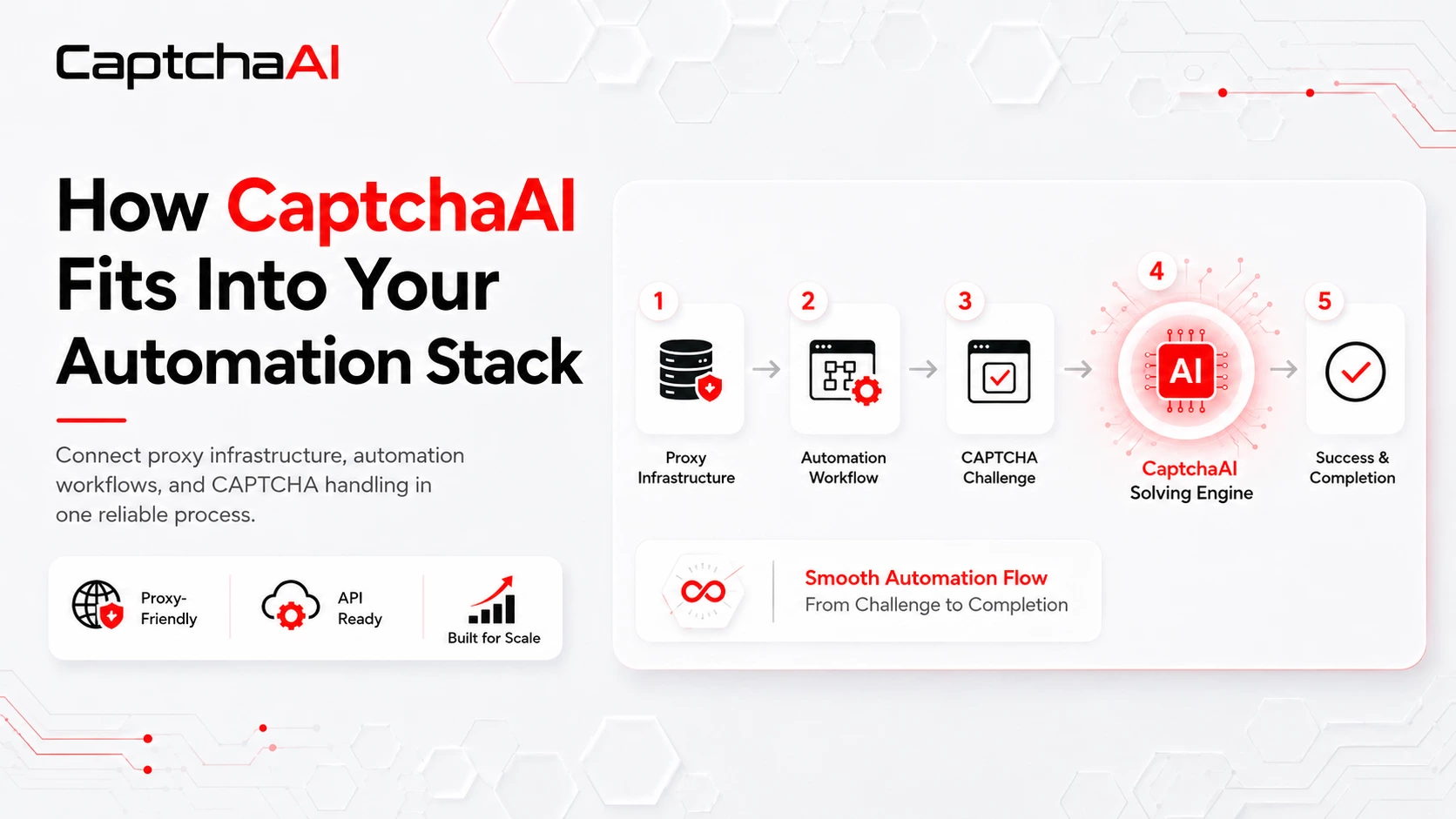
Proxies and CAPTCHA Solving Tackle Different Problems
A complete automation stack usually includes several components, and each one handles its own slice of the work.
Your proxy provider takes care of network routing, IP selection, location coverage, and connection quality. Your automation platform manages scripts, browsers, cookies, sessions, task queues, and workflow logic.
CaptchaAI handles the CAPTCHA challenges that interrupt those workflows.
These layers complement each other—but they don't replace each other.
A fresh proxy might fix a failed connection or a location mismatch, but it can't generate a reCAPTCHA token on its own, solve a distorted image, complete a grid challenge, or return the data you need from a Cloudflare challenge page.
And while your automation tool can detect when a CAPTCHA appears, it still needs a specialized component to actually solve it before the task can continue.
CaptchaAI lets you add that capability without swapping out your existing proxy provider or rebuilding the rest of your proxy-backed automation setup.
Why CAPTCHA Interruptions Matter at Scale
Manually solving one CAPTCHA might only take a few seconds. The problem gets much bigger when your automation platform is churning through hundreds or thousands of tasks.
Even occasional CAPTCHA interruptions can lead to:
- Failed tasks and incomplete data sets
- Stalled browser sessions
- Repeated request attempts
- Growing queues for manual review
- Delays in monitoring or testing schedules
- Extra engineering work
- Less predictable operational costs
Without a dedicated solving process, your team ends up treating every CAPTCHA as an unexpected failure.
With CaptchaAI integrated, supported challenges can follow a clear process. Your automation system detects the challenge, sends over the necessary info, gets the result back, applies it to the original session, and checks whether the target website accepted the solution.
This doesn't remove the need for proper monitoring, retry controls, or session management. It just gives you a consistent way to handle CAPTCHA interruptions instead of grinding every task to a halt.
Unlimited CAPTCHA Solving from $15 a Month
CaptchaAI's pricing model is one of the biggest draws for regular automation users.
Many CAPTCHA solving providers use a per-solution pricing model. With that model, your costs climb every single time another CAPTCHA gets processed.
CaptchaAI instead uses a stream-based subscription.
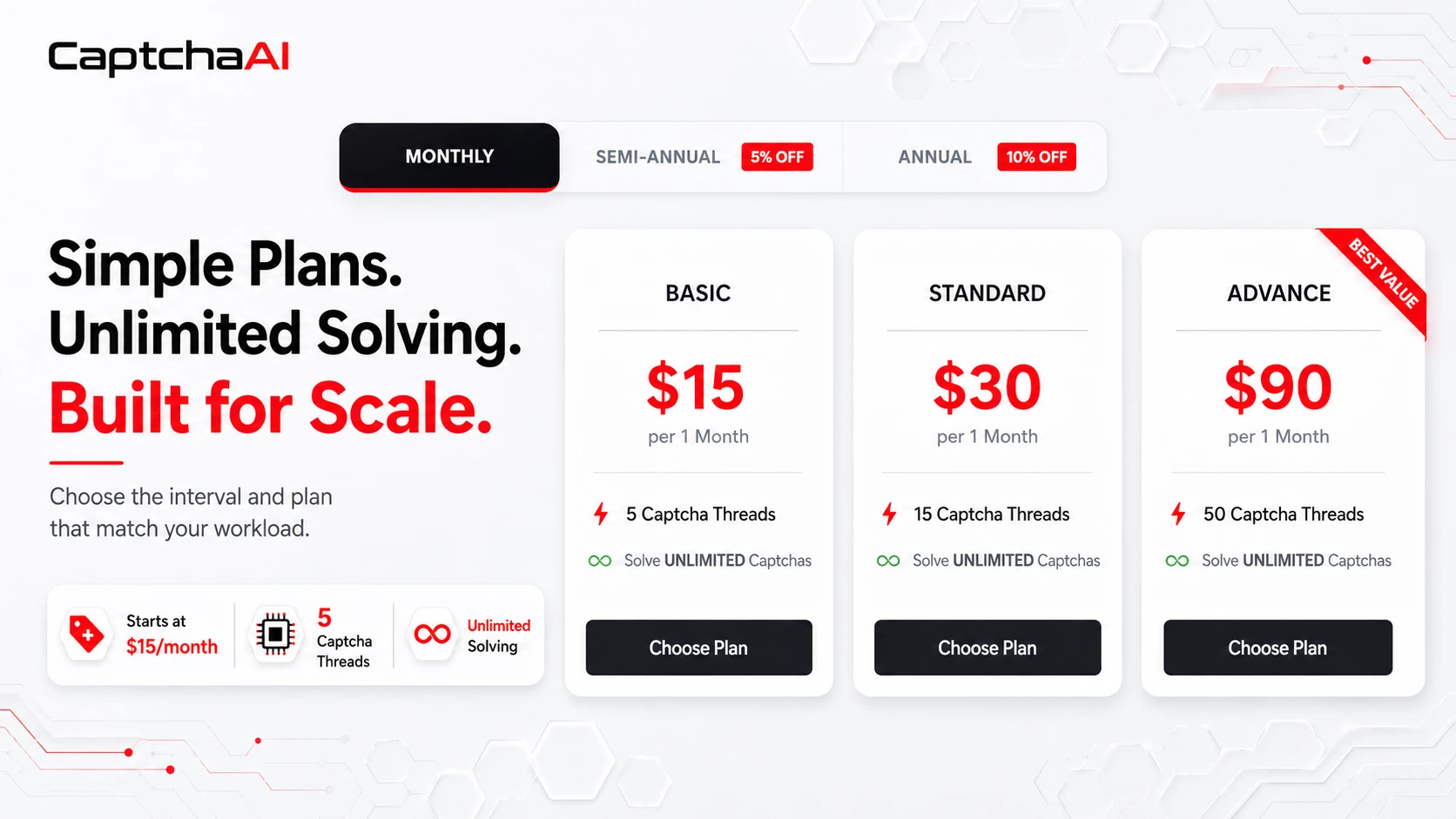
The Basic plan currently starts at $15 a month and includes five concurrent CAPTCHA streams. Every CaptchaAI plan includes unlimited solving within your available stream capacity.
There's no separate fee for each CAPTCHA you submit.
A stream is one CAPTCHA task being processed at any given moment. When a task finishes, that stream becomes available for the next request.
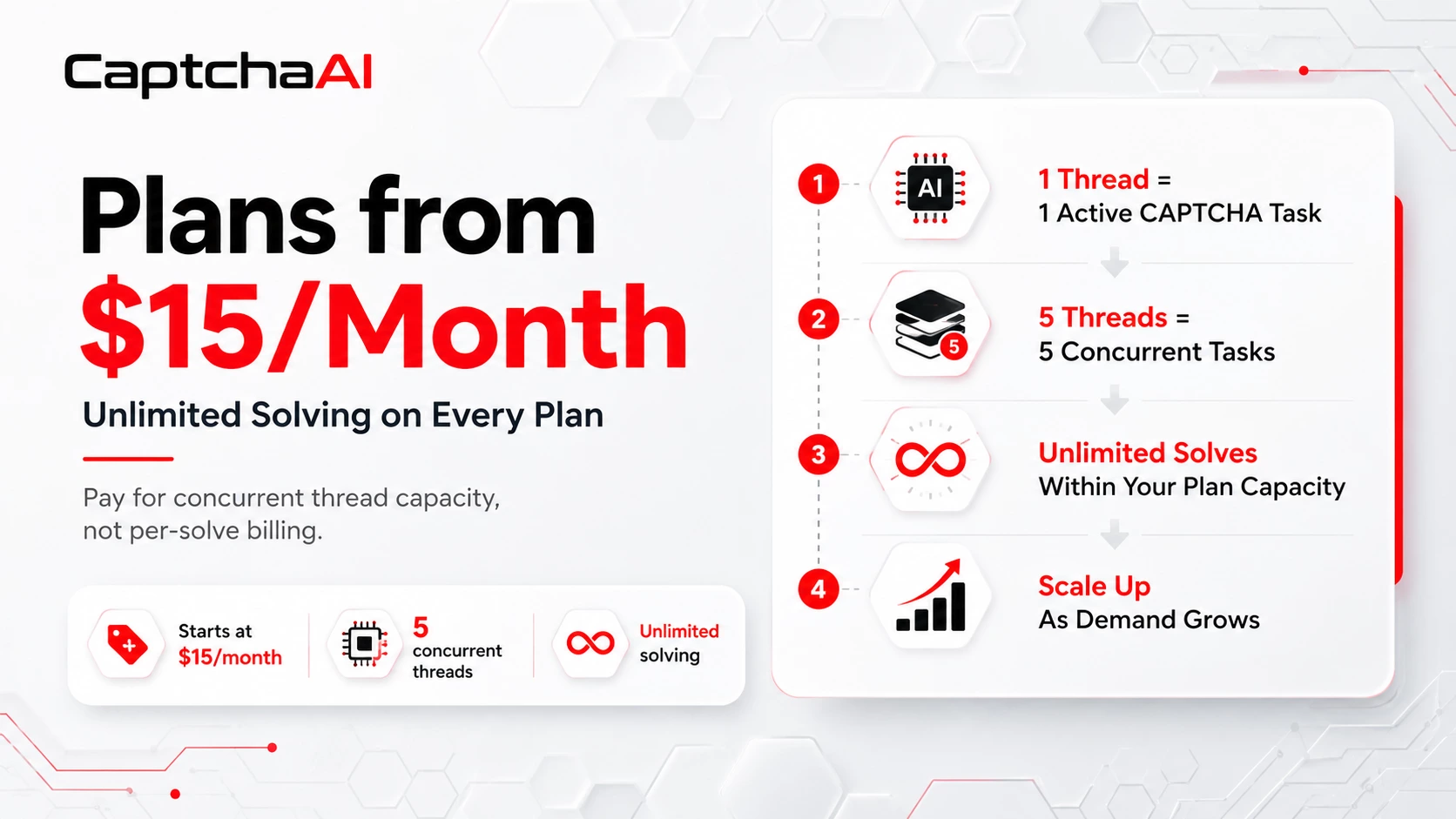
For example, a plan with five streams can handle up to five CAPTCHA tasks at the same time. It can keep processing new tasks throughout the month as streams free up.
This distinction matters:
Unlimited solving means an unlimited number of CAPTCHA submissions within your chosen concurrent stream capacity. It doesn't mean unlimited simultaneous tasks.
For ongoing or high-volume workflows, this model makes monthly costs much easier to predict. Instead of estimating a bill based on individual solves, you pick a plan that matches your expected peak concurrency.
A workflow where CAPTCHAs trickle in gradually can run with fewer streams. A system that regularly gets lots of challenges at once will need more parallel capacity.
CaptchaAI also lets you add another active plan if you need more streams, making it easy to scale capacity as your load grows.
It Works Great with Proxy-Based Automation
Proxy quality remains a key part of any CAPTCHA-related workflow.
A stable proxy helps preserve the network conditions the target site expects. Low-quality proxies, overloaded proxies, or proxies that rotate too often can cause connection failures—even if your CAPTCHA solver is working perfectly.
In some workflows, the CAPTCHA result needs to be applied using the same IP, browser session, cookies, or User-Agent that were in use when the challenge first appeared.
That's why session consistency is so important.
A returned result can get rejected if:
- Your proxy IP changes mid-task
- The browser session expires
- Cookies get applied to the wrong session
- The User-Agent changes
- Wrong task parameters are passed
- The original page context is no longer active
CaptchaAI and your proxy infrastructure therefore work best as coordinated layers.
Your proxy maintains the network route. Your automation software manages browser state and workflow logic. CaptchaAI handles the supported CAPTCHA challenge.
You shouldn't automatically route every solve request through a proxy, though. If the target site doesn't require IP matching, adding a proxy you don't need can increase latency or create an extra point of failure.
When IP consistency is required, use a stable proxy and keep the same session conditions from challenge detection all the way through final validation.
Multiple CAPTCHA Types Through One Service
Automation teams run into all sorts of verification technologies across their projects.
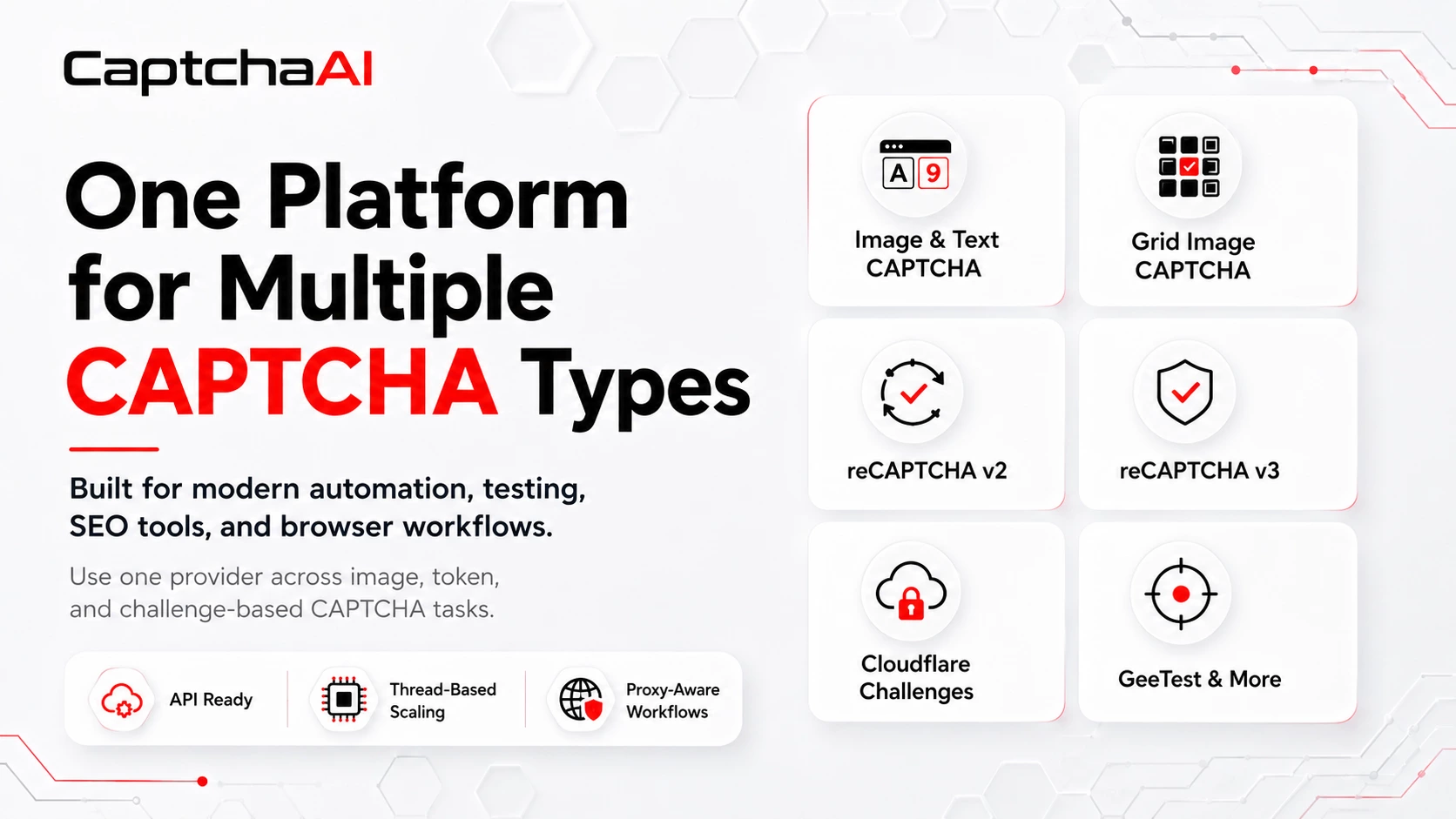
CaptchaAI currently documents support for several major CAPTCHA families, including:
- Simple text and image CAPTCHAs
- Grid image CAPTCHAs
- reCAPTCHA v2
- Invisible reCAPTCHA v2
- reCAPTCHA v2 callback-based
- reCAPTCHA v2 Enterprise
- reCAPTCHA v3
- reCAPTCHA v3 Enterprise
- Cloudflare Turnstile
- Cloudflare Challenge
- GeeTest v3
- BLS CAPTCHA
- CaptchaFox
- Friendly Captcha
- Lemin CAPTCHA
CaptchaAI also claims support for more than 27,500 image CAPTCHA formats.
Using one platform for multiple task types can cut down on the need to support a separate provider or custom integration for each site.
That said, your team should always verify the exact CAPTCHA type before going into production. You should also test the required task with your real proxy, session, and target environment—rather than assuming every implementation behaves the same way.
Flexible Integration Without Rebuilding Your Stack
Different automation teams use different tools, which is why CaptchaAI offers multiple integration paths.
Developers can connect through the CaptchaAI API from any programming environment that supports HTTP. CaptchaAI can also be accessed as a direct provider within certain automation applications.
For software that already supports compatible CAPTCHA providers, CaptchaAI offers configuration options and a Windows emulator. A browser extension is also available for supported browser-based workflows.
That kind of flexibility lets you pick the method that fits your current setup best.
A custom development team might prefer direct integration and full control over queues, validation, and logging. A user working with established automation software might prefer a compatible provider or the emulator.
The goal isn't to rebuild your automation stack—it's to add CAPTCHA handling in the most practical way for your current environment.
What a Solid Integration Should Include
Adding a CAPTCHA solver is only part of a reliable implementation.
Production workflows should also include:
- CAPTCHA detection
- Controlled task queues
- Limited retries
- Session validation
- Proxy health monitoring
- Error logging
- End-to-end acceptance testing
That last point is especially important.
Getting a result back from a CAPTCHA service doesn't always mean the target site accepted it. The result can get rejected because of an expired session, a changed proxy, incorrect site information, or an irrelevant browser context.
Your team should therefore measure successful task completion—not just how many CAPTCHA results were returned.
Useful monitoring data might include task type, processing time, proxy ID, retry count, returned error, and final acceptance status.
This information helps you tell the difference between a CAPTCHA solving issue, an unstable proxy, an expired browser session, and an incorrect integration parameter.
Who Can Use CaptchaAI?
CaptchaAI can complement your proxy infrastructure in authorized use cases like:
- Web application testing and QA
- Browser automation
- Authorized data collection
- SEO monitoring platforms
- Internal business process automation
- Client-authorized data projects
- Geo-targeted website testing
- SaaS platforms dealing with CAPTCHA interruptions
This type of workflow should only be used in environments you own, that a client has authorized you to access, or that are permitted by contract.
You're responsible for staying compliant with applicable laws, privacy requirements, contractual permissions, and the terms of service on any sites you access.
Try CaptchaAI with Your Existing Proxies
The best way to evaluate CaptchaAI is to test it with the same proxies, sessions, CAPTCHA types, and task volumes you use in your real workflow.
CaptchaAI currently offers a three-day trial with five parallel streams, so you can assess integration compatibility and estimate the throughput you'll need before choosing a paid plan.
During testing, your team should measure:
- Which CAPTCHA types appear
- How often tasks get interrupted by challenges
- Peak concurrent demand
- Session and proxy stability
- End-to-end acceptance rates
- The number of streams needed during heavy load
That gives you a more accurate basis for choosing a plan than just looking at total monthly volume.
Add Affordable CAPTCHA Handling to Your Automation Stack
High-quality proxies give you the network foundation your automation workflows need. CaptchaAI adds the specialized layer you need when supported CAPTCHA checks interrupt those workflows.
With plans starting at $15 a month, unlimited CAPTCHA solving in every plan, scalable stream capacity, multiple integration options, and support for several major CAPTCHA types, CaptchaAI gives proxy users a predictable way to handle CAPTCHAs without paying per solve.
Join the CaptchaAI Community
Get product updates, integration discussions, support insights, practical tips, and featured community offers.
Join the CaptchaAI community on Discord
Your proxy infrastructure handles the connection. Your automation software handles the workflow. CaptchaAI handles the supported CAPTCHA checks that pop up in between.