LLM Scraping in 2026: Firecrawl, Reader API, Crawl4AI, and Mobile Proxies — A Step-by-Step Guide
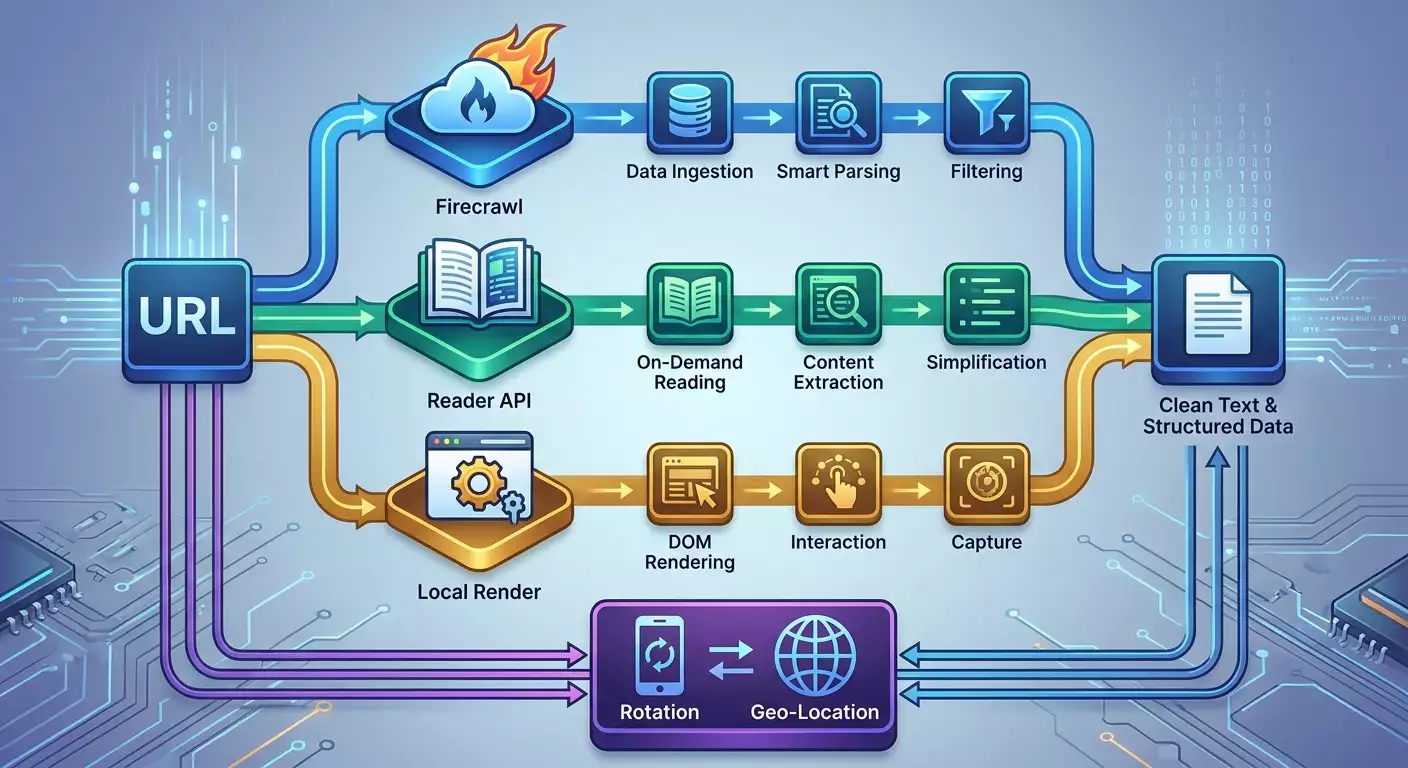
Table of contents
- Introduction
- Prerequisites
- Basic concepts
- Step 1: planning the pipeline and choosing the tool
- Step 2: prepare the environment and dependencies
- Step 3: understanding the role of mobile proxies and data center ip limitations
- Step 4: quick start with reader api (jina)
- Step 5: quick start with firecrawl
- Step 6: quick start with crawl4ai
- Step 7: connecting mobile proxy rotation
- Step 8: error handling, retries, and budget protection
- Step 9: comparing firecrawl, reader api, and crawl4ai
- Result verification
- Common mistakes and solutions
- Additional opportunities
- Faq
- Conclusion
Introduction
In this step-by-step guide, you'll learn how to implement modern LLM scraping in 2026 using three key tools: Firecrawl, Reader API (Jina), and Crawl4AI. You'll compare their capabilities, pricing, and use cases, connect mobile proxies, understand why data center proxies often yield low success rates in 2026, and receive ready-to-use Python code examples. By the end, you'll have a functional pipeline—from fetching requests to clean text, structured data, and reliable queries via mobile IP rotation.
This guide is meant for beginner developers, data analysts, SEO specialists, marketers, and advanced users looking for reliable and reproducible scraping solutions. Minimal prior knowledge is required: basic Python, an understanding of HTTP requests, and API tokens. Completion time is estimated at 2–6 hours, depending on your chosen path and testing volume.
By the end of this guide, you will have: a stable LLM scraping pipeline, connections to Firecrawl, Reader API, and Crawl4AI, HTTP(S) and SOCKS5 code examples using mobile proxies, a monitoring plan, stability checklists, and an understanding of cost optimization.
Prerequisites
For this project, you'll need: a computer with Windows, macOS, or Linux; Python 3.10+ installed; a package manager like pip; accounts with Firecrawl and Jina AI (Reader API) if you're testing those services; access to a mobile proxy provider that supports HTTP(S) and SOCKS5, with timer-based and API-based rotation. Having a stable internet connection and enough disk space for logs (at least 1–2 GB) is also crucial.
System requirements: at least 4 GB of RAM (8 GB recommended), updated root certificate authorities (usually already present in the system), and installed system dependencies for browser engines, if you opt for Crawl4AI with rendering (e.g., Playwright will download necessary components during installation).
What to download and install: Python 3.10+, pip, a virtual environment like venv (or conda), the libraries requests, httpx, pydantic (for easy validation), and selected SDK clients, or simply call the REST API. Crawl4AI requires the installation of the package and Playwright engine. Additionally, prepare a text editor or IDE like VS Code. Enable logging (log files) in your projects so you can quickly identify issues.
Backups: keep all API keys separately in a secrets manager or .env file with restricted access. For projects with local rendering, back up proxy configurations and crawling route files. In case of failure, you can roll back to a functional state.
Basic Concepts
Scraping is the automated collection of information from web pages based on predefined rules. LLM scraping is an approach where a model or “reader” based on neural networks helps extract clean text, entities, tables, or even brief summaries from pages, often eliminating the need for complex manual parser setup. Proxies are intermediary servers. Data center proxies are IPs from data centers that in 2026 are predominantly recognized by anti-bot protection systems. Mobile proxies are IP addresses from cellular network operators (real SIM cards), which usually have higher trustworthiness and less predictable patterns, resulting in a better success rate. Anti-bot signals are metrics that a site uses to determine whether you're a real user: IP reputation, ASN and geo, TLS fingerprints, request sequence, delays, rendering behavior, request frequency, and more.
A key operational principle in 2026 is that LLM extraction or readers like Reader API take care of content parsing and format normalization while a crawler (local or cloud-based) ensures stable page retrieval. Proxies form a critical reliability layer. Mobile proxies enhance success rates due to real operator ASNs, CGNAT, dynamics, and human-like traffic patterns. The common advice is to use an LLM pipeline along with mobile proxies when stable and long-term data collection from a wide range of domains is required.
It's also crucial to understand the legal aspects. Study site rules, robots.txt, terms of use, and load requirements. Comply with your jurisdiction's laws and do not collect personal data without legal grounds. Technically, you can achieve a lot, but ethically and legally, proceed with caution.
Step 1: Planning the Pipeline and Choosing the Tool
Step Goal: Understand which of the three tools fits your task, assess your budget, and create a mini-POC (Plan of Scraping Execution) with success metrics.
- Define your objective: What exactly do you want to extract—clean text, structured entities, tables, page summaries, lists of links, or images?
- Assess the sources: How many domains, what types of pages (static, dynamic, SPA), are there speed and frequency restrictions?
- Choose your tools: Firecrawl—a managed cloud crawler with LLM content condensation; Reader API (Jina)—a lightweight reader for converting URLs into clean text or markup; Crawl4AI—a local or container method with control over the browser and network.
- Calculate your budget: Firecrawl's 2026 plan typically includes a free trial and paid tiers (e.g., Starter around 19–39 USD per month for small projects, Pro around 99–199 USD, Enterprise upon request). Reader API—free tier for a limited number of pages or characters, paid around 0.002–0.01 USD per page or 1k tokens. Crawl4AI—open-source, free to use but incurs costs for infrastructure, mobile proxies, and possibly IP rotation.
- Plan your proxies: Data center IPs in 2026 yield low success rates on large sites due to reputational and behavioral filters. Plan for mobile proxies that simultaneously support HTTP(S) and SOCKS5, with timer and API rotation, along with sufficient geo coverage.
- Define success metrics: success rate (e.g., target 80–95%), average delay, cost per 1000 successful pages, frequency of rotate-IP, and fraction of correctly extracted pages via LLM.
Tip: If you're only extracting text or brief summaries, start with Reader API and a mobile proxy. If you need a managed crawl out of the box—test Firecrawl. For complex clicking and rendering scenarios—go with Crawl4AI.
✅ Check: You have a document selecting your tool, preliminary budget, and targeted success metrics.
Step 2: Prepare the Environment and Dependencies
Step Goal: Create an isolated Python environment, install necessary packages, and prepare proxy and secret configurations.
- Create a project folder: for example, llm-scrape-2026.
- Create a virtual environment: in your terminal, run python -m venv .venv and activate it (Windows: .venv\Scripts\activate; macOS/Linux: source .venv/bin/activate).
- Update pip: run python -m pip install --upgrade pip.
- Install the base packages: pip install requests httpx pydantic python-dotenv.
- If you're planning to use Crawl4AI: pip install crawl4ai playwright; then playwright install chromium.
- Create a .env file: add FIRECRAWL_API_KEY=... and JINA_READER_API_KEY=... if you're using those services; add PROXY_HOST, PROXY_PORT, PROXY_USER, PROXY_PASS.
- Create a config.json file with rotation parameters: timer in seconds, limits on requests per IP, retries, and timeouts.
⚠️ Warning: Do not store API keys in repositories. Use .gitignore and secrets managers. Leaking a key can lead to charges and account locks.
Tip: Mobile proxy providers often have free tools available, such as IP checkers, DNS Leak Tests, Proxy Checkers, proxy calculators, and delay maps. Use them before launching to ensure your IP is genuinely mobile and that the response from the desired region is stable.
✅ Check: All commands install without errors, the environment is active, keys and proxy parameters are recorded in the .env, and base commands python -c "import requests, httpx" run without exceptions.
Step 3: Understanding the Role of Mobile Proxies and Data Center IP Limitations
Step Goal: Understand why mobile proxies yield higher success rates and when they are critical.
- Evaluate anti-bot factors in 2026: sites analyze IP reputation, TLS signatures, request sequences, speed, HTTP/2 prioritization, header stability, behavior on redirects, and cookie management.
- Data center proxies are often found on reputation lists: numerous complaints, uniform traffic patterns, spikes from the same ASNs. As a result, filters frequently require complex additional checks and/or deliver block pages.
- Mobile IPs belong to real telecommunications operators. With CGNAT, dozens and hundreds of real users share a visible IP, and anti-bot systems apply lenient rules to avoid worsening user experience.
- Diversity in ASNs and geographical coverage of mobile networks enhances the similarity to real traffic and helps avoid patterns typical of data centers.
- Rotating mobile IPs by timer and API allows for quick strategy adaptation during increased error rates, lowering the risk of bans.
Tip: Plan rotations every 5–20 minutes under load and 30–60 minutes for slow scraping. Upon a sudden spike in 403/429 errors—rotate faster and reduce request frequency.
✅ Check: You understand the necessity of mobile proxies and how they improve success rates in your task. You are ready to setup rotation and retries.
Step 4: Quick Start with Reader API (Jina)
Step Goal: Obtain clean text and a brief summary of a page via a simple reader and validate functionality through a mobile proxy.
- Create a file named reader_quickstart.py in the project root.
- Add code for a request with proxy using httpx. Here's a one-liner example: import os, httpx; from dotenv import load_dotenv; load_dotenv(); proxy=f"http://{os.getenv('PROXY_USER')}:{os.getenv('PROXY_PASS')}@{os.getenv('PROXY_HOST')}:{os.getenv('PROXY_PORT')}"; headers={"Authorization":f"Bearer {os.getenv('JINA_READER_API_KEY')}","Accept":"application/json"}; url="https://r.jina.ai/http://example.com"; with httpx.Client(proxies=proxy, timeout=60.0, http2=True) as c: r=c.get(url, headers=headers); print(r.text[:500])
- Replace example.com with an actual test page containing an article or document.
- Run the file: python reader_quickstart.py and ensure you see the first 500 characters of the extracted text.
- Add error handling and retries for 429/5xx errors. Use the scheme: try up to 3 times with exponential backoff of 1–2–4 seconds, and on 403 errors initiate an IP change (see the rotation step below).
Tip: For pages with dynamic loading, Reader API is often ready to return the final compiled text. But if the content heavily depends on interactive actions, plan to use Crawl4AI.
✅ Check: You are receiving stable text from the Reader API, delay does not exceed 2–5 seconds per page, and response codes in logs are mostly 200; during retries, success is above 90% on the test domain.
Step 5: Quick Start with Firecrawl
Step Goal: Launch a page or a small crawl via Firecrawl, obtain structured content and confirm functionality through a mobile proxy.
- Create a file named firecrawl_quickstart.py.
- Add code with requests via HTTP(S) proxy. Here's a one-liner: import os, requests, json; from dotenv import load_dotenv; load_dotenv(); proxies={"http":f"http://{os.getenv('PROXY_USER')}:{os.getenv('PROXY_PASS')}@{os.getenv('PROXY_HOST')}:{os.getenv('PROXY_PORT')}","https":f"http://{os.getenv('PROXY_USER')}:{os.getenv('PROXY_PASS')}@{os.getenv('PROXY_HOST')}:{os.getenv('PROXY_PORT')}"}; headers={"Authorization":f"Bearer {os.getenv('FIRECRAWL_API_KEY')}","Content-Type":"application/json"}; payload={"url":"https://example.com","format":"markdown","include_links":True}; r=requests.post("https://api.firecrawl.dev/v1/scrape", headers=headers, proxies=proxies, data=json.dumps(payload), timeout=90); print(r.status_code, str(r.text)[:600])
- Check for a 200 response code and ensure the text contains the necessary headings or paragraphs from the target page.
- For multiple launches, add retries and limit the request frequency. Set a pause of 2–5 seconds between requests to the same domain.
- If Firecrawl has a site crawl mode, create a list of URLs or a starting URL and depth, verify correct pagination and limitations.
Tip: Use Markdown or JSON format in Firecrawl's response to directly feed the results into your LLM post-processing or indexing. This saves conversion steps.
✅ Check: You obtain structured content through Firecrawl, key sections of the page are extracted and readable, the proxy is stable, and the success rate is close to the target level.
Step 6: Quick Start with Crawl4AI
Step Goal: Deploy a local crawl with rendering, connect a mobile proxy, and ensure correct processing of dynamic pages.
- Create a file named crawl4ai_quickstart.py.
- If Crawl4AI offers a high-level interface, use it. Here’s a one-liner pseudocode example with Playwright-proxy: import os, asyncio; from dotenv import load_dotenv; from crawl4ai import Crawler; load_dotenv(); proxy_server=f"http://{os.getenv('PROXY_HOST')}:{os.getenv('PROXY_PORT')}"; proxy_user=os.getenv('PROXY_USER'); proxy_pass=os.getenv('PROXY_PASS'); async def run(): c=Crawler(headless=True, timeout_ms=60000, proxy={"server":proxy_server,"username":proxy_user,"password":proxy_pass}); html, text = await c.get("https://example.com"); print(text[:600]); asyncio.run(run())
- If your version of Crawl4AI has a different interface, consult the package documentation and Playwright parameters: proxy={"server":"http://host:port","username":"user","password":"pass"} when launching the browser.
- Verify that JavaScript-rendered content appears in the text. Compare it with what you see in a regular browser.
- Set rate limits, timeouts, and the number of simultaneous tabs to avoid overloading the target site and your proxy.
Tip: For complex sites, use a two-step strategy: first use Reader API or Firecrawl for simple pages, then use Crawl4AI for those that cannot be extracted without rendering.
✅ Check: Dynamic content is extracted. Requests via mobile proxy are stable, and errors 504/429 do not accumulate; with retries and rotations, you achieve the target success rate.
Step 7: Connecting Mobile Proxy Rotation
Step Goal: Configure IP changes based on a timer and error events to maintain a high success rate.
- Determine your rotation strategy: timer-based (every N minutes) and event-based (429/403/5xx in a row).
- If your provider offers a rotation API, add a call to your code. Here’s a one-liner pseudocode example: import requests, os; rotate_url=os.getenv('PROXY_ROTATE_URL'); token=os.getenv('PROXY_API_TOKEN'); r=requests.post(rotate_url, headers={"Authorization":f"Bearer {token}"}, timeout=15); print(r.status_code)
- Add a failure counter: upon 3 consecutive errors 429/403, perform an immediate rotation and increase the pause between requests.
- Set boundaries: avoid changing IPs more frequently than every 1–2 minutes under light load. For peak loads, coordinate with your provider for recommended intervals.
- Log all rotations, noting the time, reason, and resultant success rate after the change.
⚠️ Warning: Excessive rotation without pauses may raise suspicion due to too rapid ASN and geo-attribute changes. Maintain natural delays.
Tip: Before scaling, run a pilot on 200–500 pages, measure the error rate, adjust the rotation interval, then scale up to the full sample.
✅ Check: Rotation triggers work based on the timer and events; after an IP change, the success rate increases, and logs capture reasons and intervals.
Step 8: Error Handling, Retries, and Budget Protection
Step Goal: Implement a reliable retry strategy and limits to maintain stable spending and speed.
- Retries: use exponential backoff of 1–2–4–8 seconds with a maximum of 3–4 attempts.
- Rate control: limit QPS to 0.2–1 request per domain for initial tests. Gradually increase while monitoring error codes.
- Specific codes: for 429—reduce frequency and rotate IP; for 403—immediate IP rotation and increase delays; for 5xx—retries, possibly switch IP on 502/503/504.
- Timeouts: set 60–90 seconds, and 120–180 seconds in slow regions, while keeping an eye on budget.
- Budget limits: add a counter for successful pages and a hard daily cap to avoid exceeding the planned amount.
Tip: In the log, maintain the domain, URL, response code, duration, current IP, country of IP, number of retries, and final status. This will simplify debugging.
✅ Check: Behavior during errors is predictable, expenses are controlled, and the proportion of successful pages increases after implementing limits and rotations.
Step 9: Comparing Firecrawl, Reader API, and Crawl4AI
Step Goal: Make an informed decision for production and serve different types of pages with optimal tools.
- Firecrawl: pros—cloud crawling, content conversion and formatting, support for lists of links, and in some plans, extraction of structured blocks; cons—cost when scaled up, reliance on external SLAs.
- Reader API (Jina): pros—a very fast way to “read” a page into clean text or a lightweight format, easy integration; cons—when complex interaction with a page is required, it may lack browser rendering.
- Crawl4AI: pros—full control, rendering of complex sites, flexible click and script logic; cons—you need to manage infrastructure, monitor load and costs, and fine-tune proxies.
- Pricing for 2026 (check for current rates when reading): Firecrawl—a base plan for small projects costs around tens of dollars per month, Pro around a hundred or two, Enterprise upon request; Reader API—free tier and pricing per page/tokens in the range of thousandths of a dollar; Crawl4AI—open-source, charging for proxies, servers, and support.
- Scenarios: quick content clean-up from multiple domains—Reader API; managed crawl through sites—Firecrawl; complex SPAs, authorization, clicks—Crawl4AI. A combination is often used: Reader API for the first pass, Firecrawl for automating large lists, Crawl4AI for “heavy” pages.
⚠️ Warning: Don’t attempt to cover all cases with a single tool as a “universal” solution. A combination provides resilience and better economics.
Tip: Create a task router: based on metadata from URLs, decide what to send to Reader API, what to Firecrawl, and what to Crawl4AI. This will reduce costs.
✅ Check: You have documented recommendations for tool selection, estimated costs calculated, and confirmed success in the pilot.
Result Verification
Checklist: your Python environment runs without errors; Reader API returns clean text on test pages via a mobile proxy; Firecrawl returns 200 and structured content; Crawl4AI renders dynamic content; IP rotation operates based on timer and events; logs capture errors, delays, and success; budget remains within planning limits.
How to test: take a sample of 50–100 URLs from various domains, measure success and delay for each tool, ensuring that the overall success rate meets or exceeds the target. Verify that upon 403/429 triggers, retries and rotations activate, and after those, the success rate recovers.
Success metrics for completion: success rates of 80–95% and higher for Reader API and Firecrawl; for Crawl4AI—70–90% on complex pages at a reasonable frequency; average delay per page within 2–10 seconds for readers and 5–20 seconds for rendering; budget within planned limits.
Common Mistakes and Solutions
- Issue: mass 429 errors. Cause: too high frequency. Solution: reduce QPS, enable rotation, increase pauses between domains.
- Issue: 403 after 1–2 requests. Cause: IP on lists or suspicious sequences. Solution: immediate rotation, reduce frequency, adjust headers and User-Agent.
- Issue: timeouts of 60–90 seconds. Cause: overloaded routes or slow site. Solution: increase timeouts to 120–180 seconds or switch the geo of IP to a closer one to the site.
- Issue: empty text from the reader. Cause: dynamic rendering. Solution: apply Crawl4AI or enable an alternative data source.
- Issue: budget overruns. Cause: unlimited retries. Solution: set limits on attempts and a daily limit on successful pages.
- Issue: unstable rotation. Cause: too frequent IP changes. Solution: increase the rotation interval and set a minimum pause between changes.
- Issue: different content over time. Cause: A/B testing or personalization. Solution: save HTML snapshots, record time and headers, and account for variations.
Additional Opportunities
Advanced settings: enable distributed task queuing and domain balancing; use different mobile geographies for regional sites; save raw HTML and final texts in separate storage for auditing; build a metrics dashboard.
Optimization: combine requests to similar domains into batches; adjust timeouts based on average response times from domains; implement a smart router: if Reader API fails, send it to Crawl4AI with rendering.
What else can be done: connect LLM post-processing for summaries, classification, and entity extraction; cache stable pages; build search indexes for extracted content.
FAQ
- How to determine if one tool is sufficient? If your content is static and easily readable, Reader API is often enough. For crawling multiple pages—Firecrawl. For dynamic content—Crawl4AI.
- How often to change IPs? For moderate loads, every 10–30 minutes. Upon spikes in 403/429—rotate faster and reduce frequency.
- Is rendering necessary immediately? No. Initially, try to “read” the pages. Introduce rendering if you see empty or incomplete text.
- Why are data center IPs unsuitable in 2026? Reputational filters, anti-bot patterns, and mass flags lead to blocks. Mobile IPs usually pass because of differing traffic characteristics.
- Can I mix HTTP(S) and SOCKS5? Yes, many clients support both. SOCKS5 sometimes provides better stability under non-standard flows.
- How to reduce costs? Limit crawl depth, exclude media resources, cache stable pages, and properly set retries and rotations.
- What to do with quality fluctuations? Log all signals, save HTML samples, experiment with rotation intervals and geos, and use your provider's delay map.
- How to quickly check IP and DNS? Use built-in tests from the provider: IP check, DNS Leak Test, Proxy Checker—these help before launch.
- Can I use one proxy pool for all tools? Yes, if the provider supports concurrent protocols and sessions. It's important to control frequency on the domain.
- What are the benefits of mobile proxies for LLM scraping? Higher reputation, real operator traffic, flexible rotation—all these enhance success rates and reduce retry losses.
Conclusion
You have completed the whole cycle: set your goals, selected tools, configured the environment, connected mobile proxies, launched Reader API, Firecrawl, and Crawl4AI, implemented rotation and retries, compared results, and evaluated your budget. Next, develop your pipeline: build queuing, scale geos, add LLM post-processing, and automate metrics and logs monitoring. In 2026, stable LLM scraping is a savvy combination of tools and the right proxy strategy. For practical use, leverage tools from your proxy provider: IP checks, DNS Leak Tests, Proxy Checkers, proxy calculators, delay maps, and browser fingerprint generators. If needed, you can test mobile proxies with real SIM cards from operators, with simultaneous HTTP(S) and SOCKS5 support, flexible timer, API and link-based rotation, round-the-clock support, and a free 3-hour trial. Choose solutions with a vast pool of IPs and extensive country coverage to achieve the highest possible success rate. If you are making your first purchase, utilize promo code YOUTUBE20 for a 20% discount.